方式一
效果图
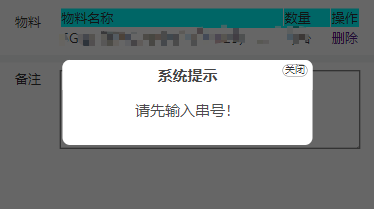
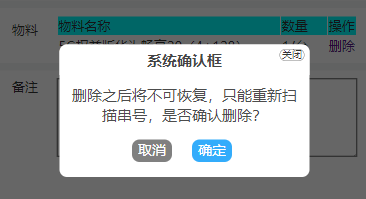
创建
创建一个alert.js
(function($) {
$.alerts = {
// 提示信息
alert: function(title, message) {
if( title == null ) title = '系统提示';
$.alerts._showAlert(title, message);
// 定时任务,三秒后自动关闭
window.setTimeout(function (){
$.alerts._hide();
},3000)
},
// 是否确定提示信息
confirm: function(title, message, callback) {
if( title == null ) title = 'Confirm';
$.alerts._show(title, message, null, 'confirm', function(result) {
if( callback ) callback(result);
});
},
_showAlert: function(title, msg) {
var _html = "";
_html += '<div id="mb_box"></div>' +
'<div id="mb_con">' +
'<span id="mb_ico">关闭</span>' +
'<span id="mb_tit">' + title +'</span>';
_html += '<div id="mb_msg">' + msg + '</div>' +
'<div id="mb_btnbox"></div>';
_html += '</div>';
//必须先将_html添加到body,再设置Css样式
$("body").append(_html); GenerateCss();
$("#mb_ico").click( function() {
$.alerts._hide();
});
},
_show: function(title, msg, value, type, callback) {
var _html = "";
_html += '<div id="mb_box"></div>' +
'<div id="mb_con">' +
'<span id="mb_ico">关闭</span>' +
'<span id="mb_tit">' + title + '</span>';
_html += '<div id="mb_msg">' + msg + '</div><div id="mb_btnbox">';
if (type == "alert") {
_html += '<input id="mb_btn_ok" type="button" value="确定" />';
}
if (type == "confirm") {
_html += '<input id="mb_btn_no" type="button" value="取消" />';
_html += '<input id="mb_btn_ok" type="button" value="确定" />';
}
_html += '</div></div>';
//必须先将_html添加到body,再设置Css样式
$("body").append(_html); GenerateCss();
$("#mb_btn_ok").click( function() {
$.alerts._hide();
if( callback ) callback(true);
});
$("#mb_btn_no").click( function() {
$.alerts._hide();
if( callback ) callback(false);
});
$("#mb_ico").click( function() {
$.alerts._hide();
if( callback ) callback(false);
});
$("#mb_btn_no").focus();
$("#mb_btn_ok, #mb_btn_no").keypress( function(e) {
if( e.keyCode == 13 ) $("#mb_btn_ok").trigger('click');
if( e.keyCode == 27 ) $("#mb_btn_no").trigger('click');
});
},
_hide: function() {
$("#mb_box,#mb_con").remove();
}
}
// Shortuct functions
myAlert = function(title, message) {
$.alerts.alert(title, message);
}
myConfirm = function(title, message, callback) {
$.alerts.confirm(title, message, callback);
};
myHide = function() {
$.alerts._hide();
};
//生成Css
var GenerateCss = function () {
$("#mb_box").css({ width: '100%', height: '100%', zIndex: '9999', position: 'fixed',
filter: 'Alpha(opacity=60)', backgroundColor: 'black', top: '0', left: '0', opacity: '0.6'
});
$("#mb_con").css({ zIndex: '999999', width: '500px',height:'auto', position: 'fixed',borderRadius:'15px',
backgroundColor: 'White',
});
$("#mb_tit").css({ display: 'block', fontSize: '30px', color: '#444', padding: '10px 15px', textAlign:'center',
backgroundColor: '#fff', borderRadius: '15px 15px 0 0',
fontWeight: 'bold'
});
$("#mb_msg").css({ padding: '20px', lineHeight: '40px', textAlign:'center',
fontSize: '30px' ,color:'#4c4c4c'
});
$("#mb_ico").css({ display: 'block', position: 'absolute', right: '10px', top: '9px',
border: '1px solid Gray', width: '50px', height: '24px', textAlign: 'center',fontSize: '20px',
lineHeight: '16px', cursor: 'pointer', borderRadius: '12px', fontFamily: '微软雅黑'
});
$("#mb_btnbox").css({position: 'relative',top: '-20px', margin: '30px 10px 10px 0', textAlign: 'center' });
$("#mb_btn_ok,#mb_btn_no").css({ width: '80px', height: '45px', color: 'white', border: 'none', borderRadius:'15px'});
$("#mb_btn_ok").css({ backgroundColor: '#33acfb',color: '#fff' });
$("#mb_btn_no").css({ backgroundColor: 'gray', marginRight: '40px' });
//右上角关闭按钮hover样式
$("#mb_ico").hover(function () {
$(this).css({ backgroundColor: 'Red', color: 'White' });
}, function () {
$(this).css({ backgroundColor: '#DDD', color: 'black' });
});
var _widht = document.documentElement.clientWidth; //屏幕宽
var _height = document.documentElement.clientHeight; //屏幕高
var boxWidth = $("#mb_con").width();
var boxHeight = $("#mb_con").height();
//让提示框居中
$("#mb_con").css({ top: (_height - boxHeight) / 2 + "px", left: (_widht - boxWidth) / 2 + "px" });
}
})(jQuery);
使用
引入alert.js
略
使用
function delete(){
    myConfirm('系统确认框',',是否确定删除?',function(r){
        if(r){
           delete();
        }
    });
}
function tip(){
    myAlert("系统提示",'请先选择目的单位!');
}
方式二
ChatGPT生成
效果图
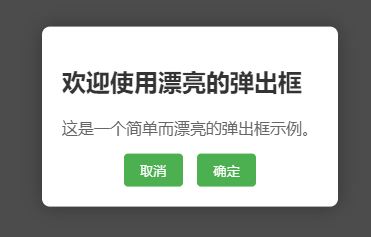
代码
<!DOCTYPE html>
<html lang="en">
<head>
<meta charset="UTF-8">
<meta name="viewport" content="width=device-width, initial-scale=1.0">
<title>Pretty Popup</title>
<style>
/* body {
font-family: 'Segoe UI', Tahoma, Geneva, Verdana, sans-serif;
background-color: #f4f4f4;
margin: 0;
display: flex;
align-items: center;
justify-content: center;
height: 100vh;
} */
#overlay {
display: none;
position: fixed;
top: 0;
left: 0;
width: 100%;
height: 100%;
background: rgba(0, 0, 0, 0.7);
opacity: 0;
transition: opacity 0.3s ease-in-out;
}
#popup {
display: none;
position: fixed;
top: 50%;
left: 50%;
transform: translate(-50%, -50%);
padding: 20px;
background: #fff;
box-shadow: 0 0 20px rgba(0, 0, 0, 0.3);
border-radius: 8px;
opacity: 0;
transform-origin: center;
transition: opacity 0.3s ease-in-out, transform 0.3s ease-in-out;
}
#popup h2 {
color: #333;
}
#popup p {
color: #666;
}
#popup button {
margin-right: 10px;
padding: 8px 16px;
background-color: #4caf50;
color: #fff;
border: none;
border-radius: 4px;
cursor: pointer;
}
#popup button:last-child {
margin-right: 0;
}
#popup button:hover {
background-color: #45a049;
}
/* 显示动画 */
#overlay.active, #popup.active {
display: block;
opacity: 1;
}
#popup.active {
transform: translate(-50%, -50%) scale(1);
}
</style>
</head>
<body>
<button onclick="openPopup()">显示带两个按钮的漂亮弹出框</button>
<div id="overlay" onclick="closePopup()"></div>
<div id="popup">
<h2>欢迎使用漂亮的弹出框</h2>
<p>这是一个简单而漂亮的弹出框示例。</p>
<div style="text-align:center;">
<button onclick="closePopup()">取消</button>
<button onclick="confirmAction()">确定</button>
</div>
</div>
<script>
function openPopup() {
document.getElementById('overlay').classList.add('active');
document.getElementById('popup').classList.add('active');
}
function closePopup() {
document.getElementById('overlay').classList.remove('active');
document.getElementById('popup').classList.remove('active');
}
function confirmAction() {
alert("你点击了确定按钮!");
closePopup(); // 可以根据需要执行其他操作
}
</script>
</body>
</html>